


Solved

Initial Sort When adding new Custom Fields to list

  • May 21, 2024
  • 3 replies
  • 134 views

jjmcdev
Forum|alt.badge.img

Just now starting to play around with the new Custom Fields Beta and will be posting things I either have questions about or I think is unexpected behavior.


The first thing is about modifying the sort order of the custom fields.


Issue/Question 1 - Initial Sort of new fields

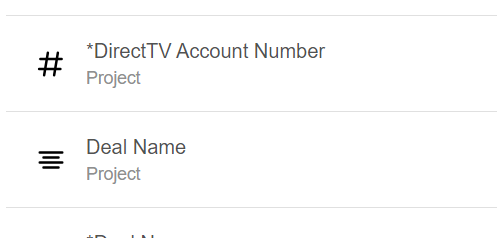
When I started I had a list of about 8 old custom fields and as I created new custom fields for this trial - I added a “*” at the beginning to differentiate them.  As I added each one it added it to the bottom of the list - which is what I expected.  Except one field - the only field that was the type of Number - it put it at the top of the list - I don’t think that should have happened - it should have gone to the bottom in the order I entered it.


Best answer by chrishaleua

Agreed. I think this is related to the other sort order issue you reported in this related comment: 


We will get both fixed quickly. Thanks for the detailed steps to reproduce the issue!

3 replies

chrishaleua
Forum|alt.badge.img
  • Community Manager
  • Answer
  • May 22, 2024

Agreed. I think this is related to the other sort order issue you reported in this related comment: 


We will get both fixed quickly. Thanks for the detailed steps to reproduce the issue!


jjmcdev
Forum|alt.badge.img
  • Author
  • Inspiring
  • May 22, 2024

Thanks @chrishaleua .  I used to be a Business Analyst on a Software Dev Team and did Software QA as part of my job for 20 years. 😊


chrishaleua
Forum|alt.badge.img
  • Community Manager
  • May 22, 2024

Great news! This has now been fixed. Thanks again for applying your 2 decades of QA experience to ensure a reliable GA release in the next day or 2.