Solved

Export of a single Project Milestones

  • February 1, 2024
  • 2 replies
  • 536 views

RChopra

Hello,

I am trying to export a single project’s all milestones, and export feature giving me list of projects in export.


Please help.


RC. 

 

Best answer by emaynez

Hi @RChopra! Great question! 


To export project milestones and tasks what I recommend doing is:

  1. Open the Tasks page (2nd icon on the nav bar under the projects icon)
  2. Open the Filter tool
  3. Unselect any filters that are being applied
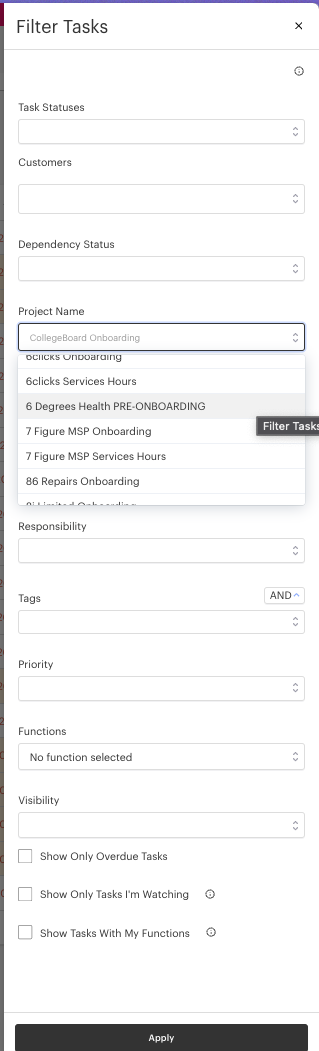
  4. Filter by “Project Name” (See attached picture)
  5. Click the Export button! (see image below)
  6. You will receive an email with a CSV containing all the tasks and milestones from that specific project.

Hopefully this helps!


2 replies

emaynez
Forum|alt.badge.img
  • Community Manager
  • Answer
  • February 1, 2024

Hi @RChopra! Great question! 


To export project milestones and tasks what I recommend doing is:

  1. Open the Tasks page (2nd icon on the nav bar under the projects icon)
  2. Open the Filter tool
  3. Unselect any filters that are being applied
  4. Filter by “Project Name” (See attached picture)
  5. Click the Export button! (see image below)
  6. You will receive an email with a CSV containing all the tasks and milestones from that specific project.

Hopefully this helps!


RChopra
  • Author
  • February 1, 2024

Elan,

Thank you!