The team member marked a task as done a few days later than they actually completed it. How can we make it match reality?
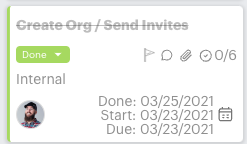



The team member marked a task as done a few days later than they actually completed it. How can we make it match reality?
Best answer by emaynez
This is a great question!
You can change the due date, but not the “done date” of a task. The Done date is stamped when the status changes of the task is moved to “Done”.
There is a way to overwrite it, but you’d have to use the API and Postman (or another API platform tool). You can update a task’s completedAt date. See the documentation here: https://api.guidecx.com/api/v2/docs#patch-/tasks/-id-
If you see this happening a lot, then it may be more of a question about reminding your team to mark tasks as done when they complete them.
Enter your E-mail address. We'll send you an e-mail with instructions to reset your password.
